 Skip to content

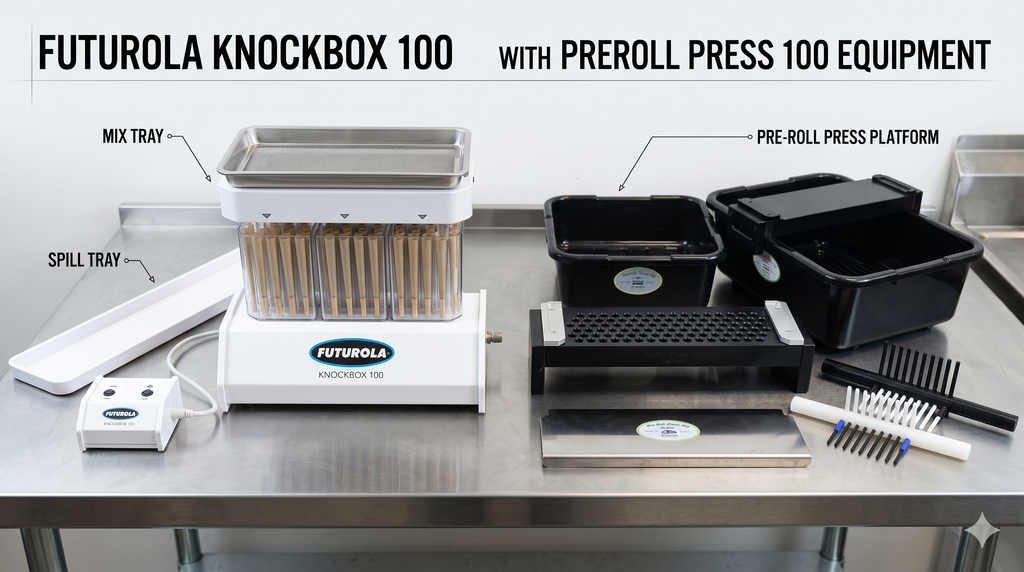
The Futurola Knockbox 100 is a familiar piece of equipment in commercial pre-roll production. For many operators, it’s the filling machine they already know, use, and rely on.
But owning a Knockbox also brings practical questions. Which parts come with the machine? Where can you find the operating manual? What should you check when something isn’t working as expected? And if the machine is already handling your filling requirements, is there a way to improve the rest of the production process without replacing it?
This guide covers the Futurola Knockbox 100 manual, its main components, maintenance considerations, and compatible accessories. We’ll also look at how PreRoll Press’s Press 100 equipment can complement an existing Knockbox setup.
What Is the Futurola Knockbox 100?
The Futurola Knockbox 100 is a commercial cone-filling machine designed to process batches of up to 100 pre-rolled cones using a compatible filling device and mix tray.
The system uses a powered base and controller to help distribute and settle material into pre-rolled cones. Rather than filling every cone separately, operators can prepare an entire batch using the appropriate components.
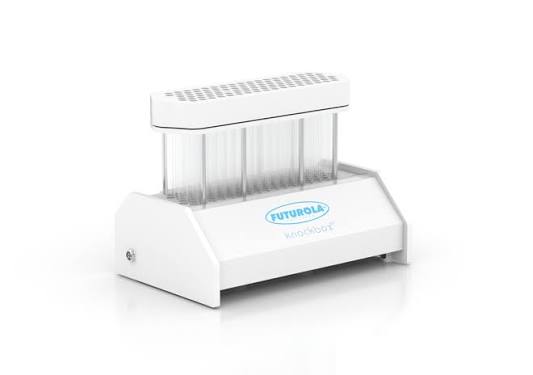
However, filling is not the same as producing a completely finished pre-roll.
After the filling stage, operators still need to consider unloading, closing the open ends, inspecting the finished products, and preparing the next batch.
These additional stages are important when evaluating the overall efficiency of any pre-roll production setup.
Futurola Knockbox 100 Manual: Where to Find It and What It Covers
If you’re setting up a Knockbox for the first time, replacing equipment components, or troubleshooting a problem, the manufacturer’s operating instructions should be your starting point.
Futurola has published a Knockbox operating guide that covers machine components, assembly, controller use, operation, cleaning, and limited warranty information.
View the Futurola Knockbox Operating Instructions (PDF)
The available document includes references to Knockbox 2 hardware, so owners should confirm that the instructions correspond to their specific model and controller generation before relying on model-specific procedures.
What Should You Check in the Manual?
The most useful sections are those covering:
- Identification of the supplied components.
- Assembly and alignment of the filling equipment.
- Controller connections and available settings.
- Operation of the filling and unloading systems.
- Cleaning and routine maintenance.
- Manufacturer support and warranty information.
A useful habit is to keep the appropriate manual available near the production area, particularly when multiple operators share responsibility for the equipment.
For current machine specifications and available accessories, you can also refer to Futurola’s official Knockbox 100 product page.
Futurola Knockbox 100 Parts Explained
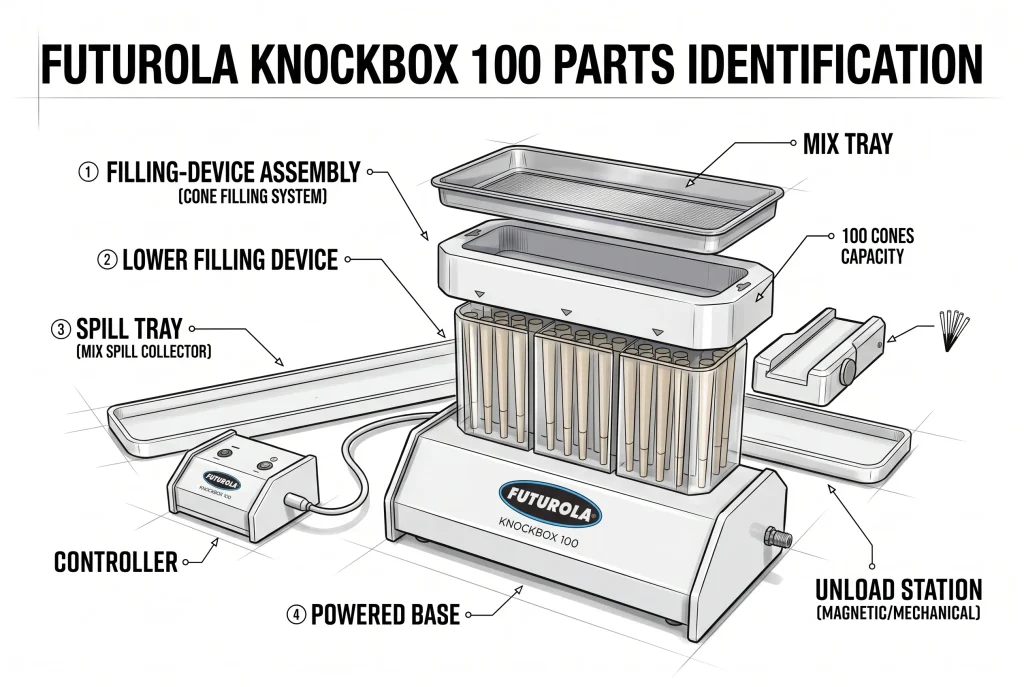
Understanding the machine’s individual components makes it easier to identify missing equipment, order compatible replacements, and communicate problems to technical support.
The standard Knockbox documentation identifies the following main components.
| Component | Function |
| Knockbox Base | Powered foundation that supports the filling system |
| Controller | Operates the machine and provides the available density settings |
| Power Adapter | Supplies electrical power to the equipment |
| Mix Spill Collector | Collects material that escapes during normal handling |
| Mix Tray | Holds and distributes material across the filling positions |
| Upper Filling Device | Forms part of the cone-filling assembly |
| Lower Filling Device | Supports cones within the filling system |
| Unload Station | Assists with transferring filled cones out of the filling device |
The supplied components can vary depending on the model, filling-kit package, and equipment generation. Check your original purchase details before assuming every accessory was included.
Knockbox Base and Controller
The base and controller are central to the powered filling process.
The manufacturer’s operating guide describes high- and low-density controller settings. These are associated with the machine’s filling operation, rather than an independently adjustable mechanical compression plate.
If you need to replace the controller, confirm the exact model and connector compatibility with Futurola.
Mix Tray and Filling Device
The mix tray and filling-device assembly work together during material distribution and filling.
Correctly matched components are important because different cone formats may require different filling-device configurations.
Futurola offers various filling kits and accessories for its Knockbox range. Before ordering a replacement, identify the cone format, filling kit, and model currently in use.
Unload Station and Other Accessories
The unload station supports the handling of filled cones after a production cycle.
Futurola also offers accessories such as cone loaders and Dutch Crown devices for compatible systems.
It’s important to distinguish these Futurola components from equipment produced by third-party manufacturers, including PreRoll Press.
Original Futurola replacement parts and PreRoll Press Press 100 accessories serve different purposes. Knowing which type of product you need helps avoid unnecessary purchases and compatibility problems.
Understanding the Knockbox 100 Production Workflow
The Knockbox is designed primarily around batch filling.
Its overall workflow includes preparing the appropriate filling equipment, loading compatible cones, distributing material through the mix-tray system, running the filling operation, and transferring the filled cones for subsequent production stages.
The manufacturer’s instructions explain the specific procedures for your hardware version.
For production managers, the most important consideration is how the machine fits into the full process.
A filling operation may be efficient while other activities, such as preparation, unloading, closing, inspection, or packaging, create delays.
This is why evaluating a machine solely by its advertised filling-cycle time can be misleading.
What ultimately matters is how many acceptable, finished pre-rolls your facility can produce using the staff and equipment available.
Cleaning, Maintenance, and Common Knockbox Issues
Routine maintenance is important for maintaining reliable equipment performance and reducing interruptions during production.
Futurola’s operating documentation describes cleaning methods for the Knockbox base and removable filling components.
It also specifically warns against submerging electrical components in water or cleaning solutions.
Always follow the instructions for your particular model before cleaning or servicing the equipment.
Uneven Filling or Inconsistent Results
If a batch is inconsistent, review the condition of the material, filling-device compatibility, component alignment, and the operating procedure recommended by Futurola.
Avoid assuming that the controller or base is defective before checking these other variables.
Material Buildup
Inspect removable components for accumulated material and follow the manufacturer’s approved cleaning guidance.
The Knockbox base and electrical components should not be treated the same way as removable filling accessories.
Controller or Power Problems
If the equipment does not respond as expected, check that the correct power supply and controller are being used and consult the relevant operating manual.
Avoid attempting internal electrical repairs without appropriate manufacturer guidance.
Parts That Don’t Fit
A component may appear suitable for a Knockbox but still be intended for a different model, filling kit, or cone format.
Check the exact machine version, component designation, and compatibility before purchasing replacements.
When a fault remains unresolved, contact Futurola or an authorized service provider rather than repeatedly operating equipment that may be damaged.
Already Own a Futurola Knockbox 100? Here’s Where Press 100 Comes In
If your Knockbox is meeting your filling requirements, replacing the entire machine may not be necessary.
The next question is whether the stages surrounding filling could be better organized.
The Knockbox handles the filling process, but pre-rolls still need to be transferred, packed or finished as required by the operation, and prepared for inspection and packaging.
PreRoll Press developed the Press 100 range for use with compatible Futurola Knockbox and RAW Thumper equipment.
Its purpose is to complement an existing filling setup with dedicated work trays and press tools that support the subsequent handling and finishing workflow.
Rather than starting with an entirely new machine, operators can evaluate how compatible Press 100 components might fit into their current production process.
Explore Press 100 Kits for Futurola Knockbox
Press 100 Single Tray Package
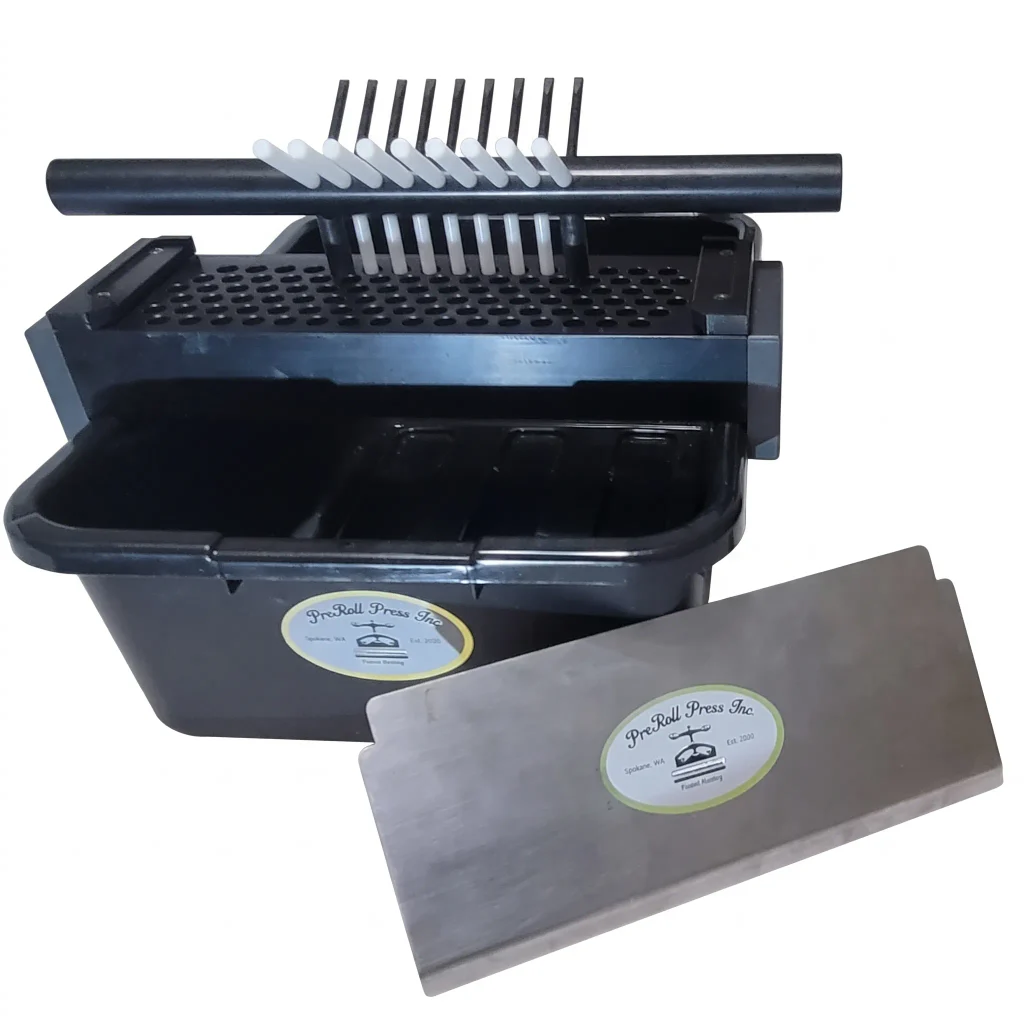
For producers introducing Press 100 equipment into an existing Knockbox setup, the Single Tray Package is a practical starting point.
According to the current PreRoll Press listing, the package includes:
- One work tray in the selected 84mm, 98mm, or 109mm size.
- One compatible press tool.
- One catch bin.
Listed price: $1,800 USD.
The Single Tray Package may suit an operation that primarily produces one cone size and wants to introduce the Press 100 workflow without purchasing additional trays immediately.
It also provides an opportunity to evaluate how the equipment fits into the facility’s existing layout and production procedures.
View the Press 100 Single Tray Package
Press 100 Double Tray Package
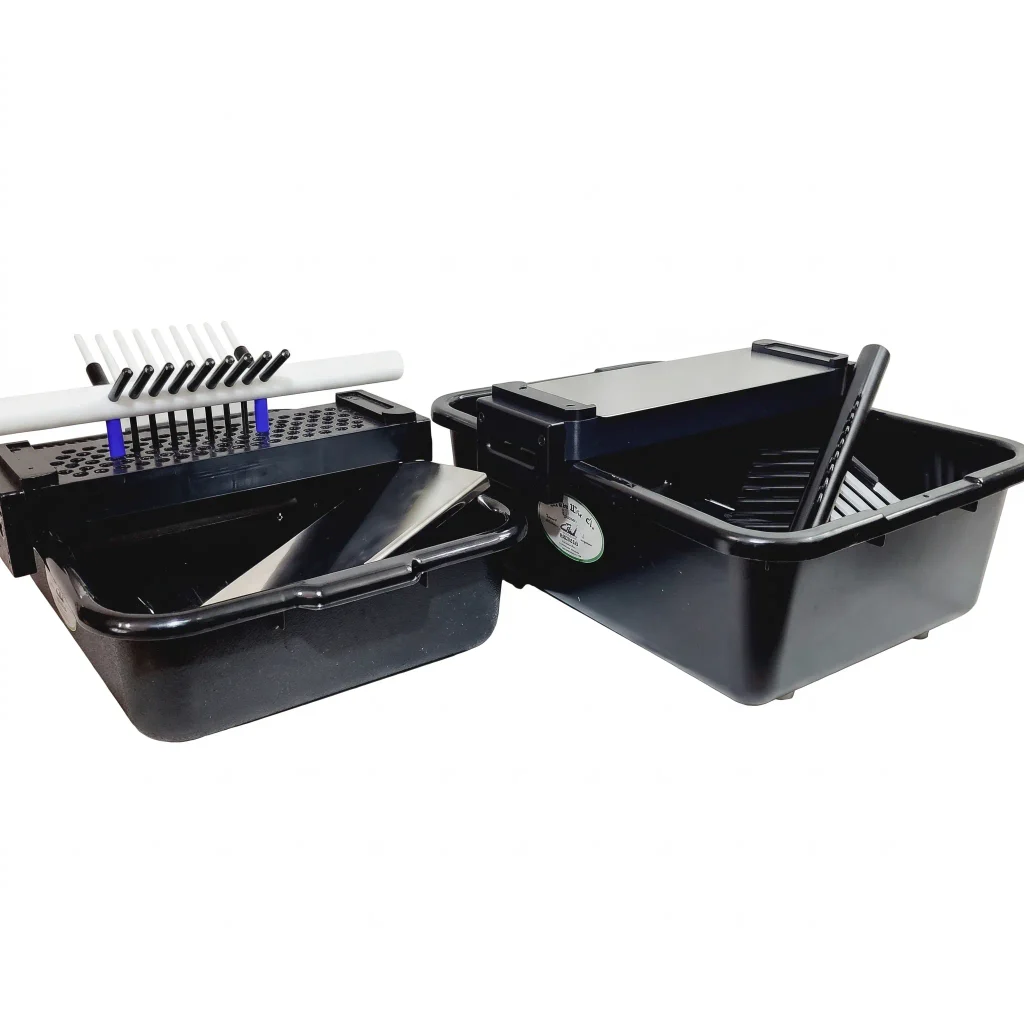
As production requirements increase, having more than one work tray available can make it easier to organize different stages of a batch.
The Press 100 Double Tray Package includes:
- Two work trays selected from the available sizes.
- Two compatible press tools.
- Two catch bins.
Listed price: $3,400 USD.
An operation with multiple employees may benefit from having a second tray available for preparation or finishing while another batch is being handled.
However, two work trays do not automatically mean twice the hourly production output.
The actual benefit depends on the facility’s staffing, available equipment, production methods, and existing bottlenecks.
For operations where tray availability limits workflow flexibility, the Double Tray Package may be worth considering.
View the Press 100 Double Tray Package
Press 100 Work Tray
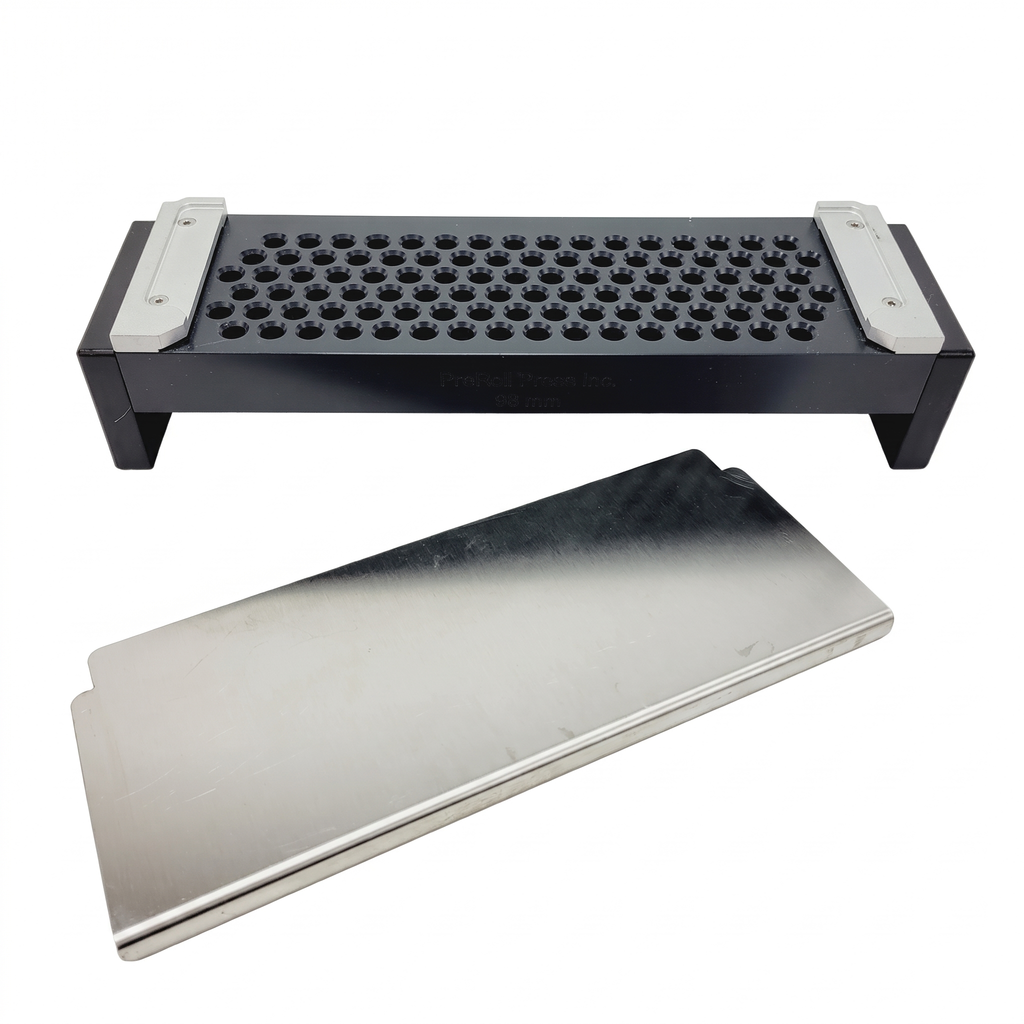
Not every operator needs another complete package.
If you already have suitable Press 100 equipment and need an additional work tray, PreRoll Press offers the tray as a separate product.
The listed options currently include:
- 84mm
- 98mm
- 109mm
Listed price: $1,400 USD.
An additional work tray may be useful when expanding an existing setup or organizing multiple batches.
Before ordering, confirm the size required and whether your current press tool and filling equipment are compatible.
Explore the Press 100 Work Tray
Press 100 Tool
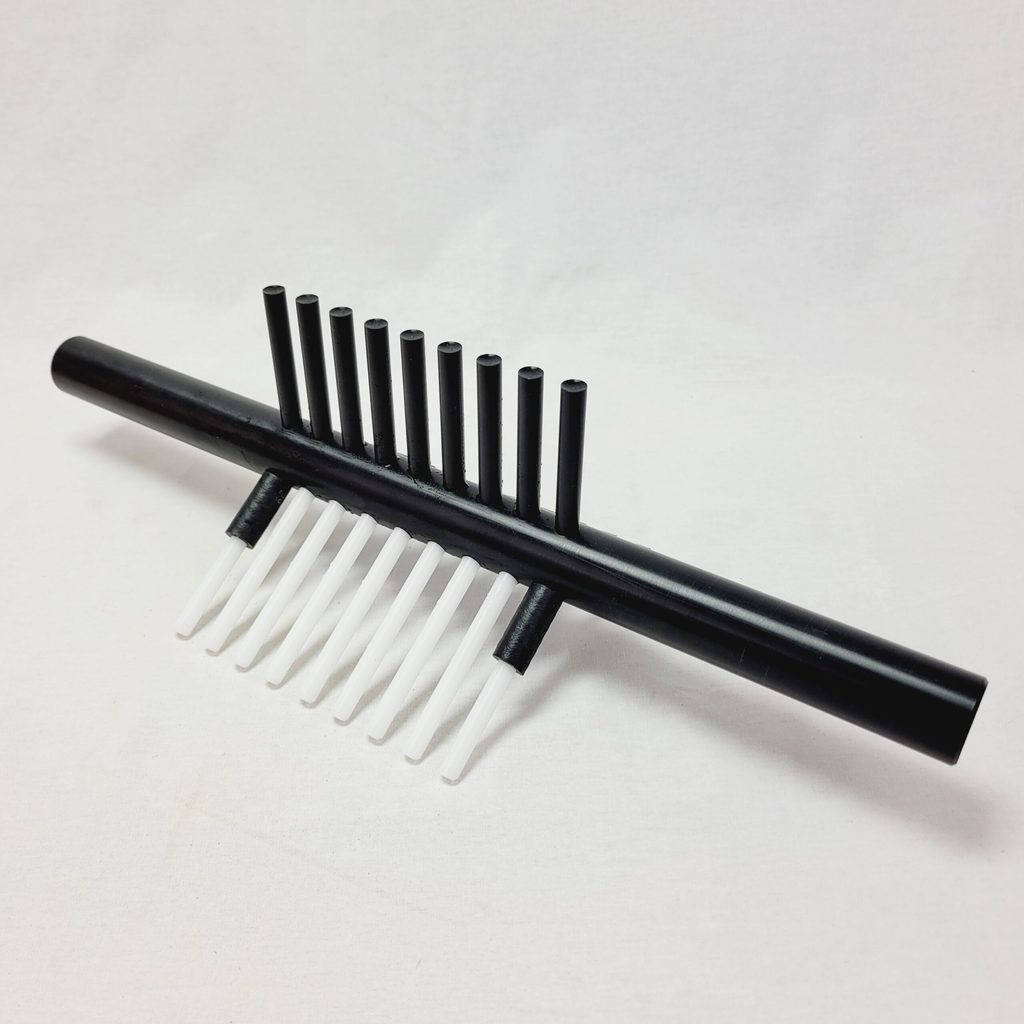
The Press 100 Tool is also available as an individual component.
The current product listing identifies two tool-size groups:
- Large: For 98mm and 109mm work trays.
- Small: For smaller work-tray configurations, including 84mm.
The product’s variant selector also references 70mm within the small-tool size group, although the currently listed Press 100 work-tray packages offer 84mm, 98mm, and 109mm selections.
If you are considering a 70mm configuration, confirm the availability of a compatible work tray directly with PreRoll Press.
Listed price: $400 USD.
Choosing the correct tool is important. A press tool intended for a different tray-size group should not be assumed to fit an existing setup.
Comparing the Press 100 Products
The four products serve different purchasing needs.
| Press 100 product | Main components | Listed price |
| Single Tray Package | 1 work tray, 1 press tool, 1 catch bin | $1,800 |
| Double Tray Package | 2 work trays, 2 press tools, 2 catch bins | $3,400 |
| Work Tray | 1 size-specific work tray | $1,400 |
| Press 100 Tool | 1 size-specific press tool | $400 |
Prices are in USD and reflect the publicly listed PreRoll Press prices checked in November 2026. Confirm current pricing, selected sizes, package contents, and equipment compatibility before ordering.
Which Press 100 Configuration Makes Sense for Your Facility?
Start with what your operation already owns.
If you’re adding Press 100 equipment for the first time, the Single Tray Package may be a reasonable starting point.
If your production workflow could benefit from two work trays, consider whether the Double Tray Package offers a practical advantage.
If you’re expanding an existing Press 100 setup, purchasing a separate work tray or press tool may be more appropriate.
The objective is not to buy the most components. It’s to identify which equipment addresses an actual need in your production process.
See How Press 100 Works with Existing Filling Equipment
A product specification can tell you what’s included in a package, but a demonstration is often the best way to understand how equipment fits together.
PreRoll Press has published a demonstration involving the Press 100 and compatible Futurola Knockbox and RAW Thumper filling equipment.
The video provides a practical reference for operators interested in how Press 100 components complement an existing system.
Before purchasing compatible accessories, verify your machine version, filling-device configuration, and cone-size requirements with PreRoll Press.
Should You Upgrade Your Knockbox or Consider a Complete Fill N Fold System?
The right decision depends on whether your existing filling machine still meets your production requirements.
If you’re satisfied with the Knockbox and primarily want to improve the surrounding workflow, Press 100-compatible equipment may be the more relevant starting point.
But if you’re establishing a new production facility, replacing an older filling setup, or reconsidering your entire production process, comparing complete systems may also make sense.
PreRoll Press manufactures Fill N Fold commercial pre-roll machines that use a separate, operator-controlled tray-based approach to filling, packing, and Dutch Crown finishing.
The Fill N Fold range includes Single, Double, Triple, and All-In configurations designed around different production requirements.
Unlike a Press 100 accessory purchase, a complete Fill N Fold system is intended as a broader production-equipment solution.
Neither option is automatically right for every facility.
The decision should account for your current machines, cone sizes, staffing, production targets, budget, and plans for future expansion.
Frequently Asked Questions
Where can I find the Futurola Knockbox 100 manual?
Futurola has published Knockbox operating instructions covering components, setup, operation, maintenance, and warranty terms. Check that the document matches your equipment generation before following model-specific procedures.
Access the manufacturer operating guide.
What are the main parts of the Futurola Knockbox 100?
The system uses a powered Knockbox base, controller, power adapter, and compatible filling equipment. Depending on the package and model, components can include a mix tray, filling device, spill collector, and unload station.
Are Press 100 parts manufactured by Futurola?
No. Press 100 products are manufactured and sold by PreRoll Press as accessories for use with compatible Futurola Knockbox and RAW Thumper equipment. They should not be confused with original Futurola replacement parts.
Does the Futurola Knockbox 100 automatically close pre-rolls?
The Knockbox is primarily a filling machine. Finishing and closure depend on the equipment and accessories used in the operation. Some setups use separate closing equipment or additional operator-led finishing steps.
Can I purchase Press 100 components separately?
Yes. PreRoll Press lists individual work trays and press tools, along with Single and Double Tray packages.
Does adding a second Press 100 work tray double production speed?
Not necessarily. A second tray provides additional workflow flexibility, but actual output depends on staffing, preparation, filling, finishing, and the way the equipment is used.
Which Press 100 tool size should I choose?
The listed large press tool covers 98mm and 109mm work trays. Smaller configurations use the small tool. Confirm the exact work-tray size and compatibility before purchasing.
Can I use Press 100 accessories with every Knockbox model?
Do not assume universal compatibility. Press 100 products are marketed for compatible Knockbox and Thumper equipment, but operators should verify their exact machine model, filling-device setup, and required cone size before ordering.
Making the Most of the Equipment You Already Own
The Futurola Knockbox 100 remains a useful part of many commercial pre-roll production setups.
Keeping it working effectively starts with understanding the equipment, maintaining the correct components, and using the appropriate manufacturer documentation.
But improving production doesn’t always require replacing a machine that’s already doing its job.
If filling is working well and another stage is creating delays, compatible accessories may offer a more focused option.
PreRoll Press’s Press 100 range is designed for operators who want to explore that possibility while continuing to use compatible Knockbox or Thumper filling equipment.
Explore Press 100 Kits and Accessories
If you’re evaluating an entirely new production setup, you can also compare Fill N Fold commercial pre-roll machines.
For compatibility questions or help selecting a Press 100 configuration, contact PreRoll Press before placing your order.